Monday, 23 April 2018

Colour on Colour

Last time we were in Amsterdam, we arrived in early May and that year, the bulb fields were 2 weeks early. Consequently, although we visited the Keukenhof Gardens, there were no flowers in the fields. This time, we planned to come in mid-April to make sure we got the fields in flower. The moment she heard we were doing that, my daughter eagerly jumped on the chance to come down for the day for a bike ride in the fields.

We left the house at 8:45 AM, early enough to catch the morning stillness.
Our canal
We picked up the bikes we found Saturday, and headed to the station. We bought our bikes day passes (€6 each), struggled through the turnstiles, and stuffed them on the train.
Ours on the left
You can take your bike on the train (weekends and non-rush hours), but my goodness, there's not a lot of space. The Sprinter trains have more space; you could fit 6 bikes in the one space on each of the two end cars. The fancier double decker IC trains fit only 3 bikes per car.

We headed to Haarlem, which is not close to the bulb fields but had other things we wanted to see. When trying to exit through the stations turnstiles, my OV-Chipkaart didn't work (what a surprise). I went to the NS service counter and neither Karen's nor my cards had actually been set up for use on the trains (not sure how we made it though to board in A-Dam). As I mentioned in the last post, the "automated" process to set them up was confusing as quantum theory, and what we did, didn't work. Sigh. I told the lady to make sure we were charged for the AMS-Haarlem run, but she said not to worry.

Out of the station, we went to the town centre and locked up our bikes. We started here to see the floats of the famous Bloemencorso Bollenstreek parade that took place Saturday, which is a celebration in the fields themselves of the flowers being harvested. There were at least 30 floats, and we each had our favourites.
Camels made out of bulbs 
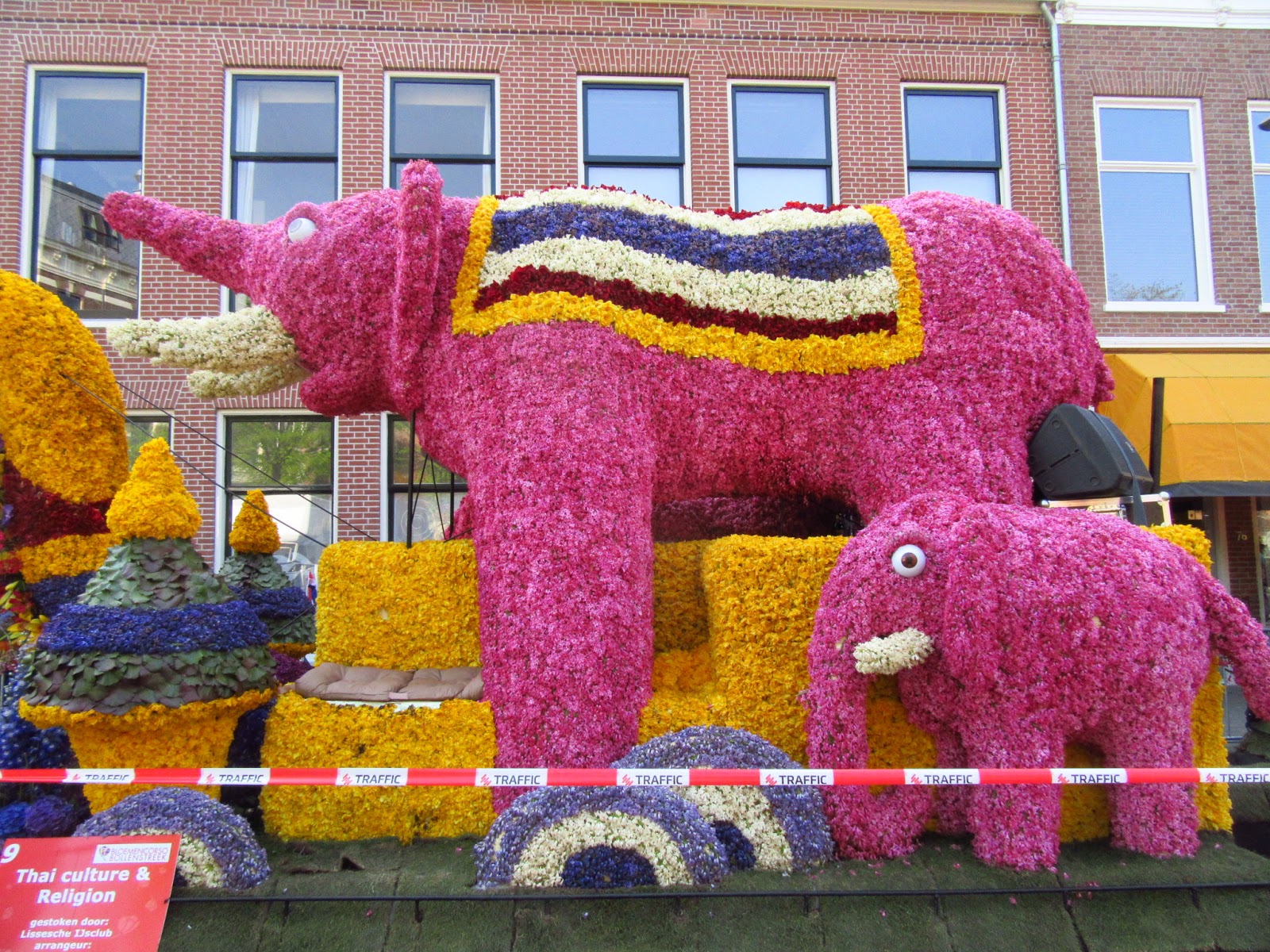
Elephants on a Thai float 
Very well done 
A knight with a lance 
A giant pink pig makes it's debut 
The pig's curly tail
A harp. Note the "strings" 
One of the strings; note the building in refraction 
More strings 
Grand prize winning dragons 
The dragon on the other end with LED eyes
A Movie camera and clapper 
I had trouble facing this float 
There's a strong resemblence between the lady in the middle and the face on the left

Antherium wings
We were very impressed. While it was quiet when we got there, it was quite busy when we cycled away.

Cycling in the country in the Netherlands is much like cycling in Belgium; there are fietsroutes (bike routes) that run from numbered intersection to numbered intersection. Planning a route is as simple playing connect the dots (or at least it is when you can see the small signs directing the way). I was using the Fietsknoop app (highly recommended) to follow a route out of town. We rode for a while before arriving at the fields, some of it through beautiful woods...
Outskirts of Haarlem
...past fields with cattle that looked like an English Sheepdog with horns...
Scottish Highland Cattle, actually
...and past windmills.
How Dutch
I only got lost a few times; the signage is OK but not great. A little over an hour after leaving Haarlem's downtown, we arrived at the first of the fields, and of course, had to stop much as we would do for the rest of the day.
Yellow, but... 
Orange, red & green 
A heron despoils the picture 
Purple, white, pink and green 
Let the colours not mix 
This is monoculture at it's finest. Except when an errant bulb shows up, out of place. They are fun to find and fun to photograph: bulbs that "didn't get the memo".
Red in a sea of yellow 
This one can't decide what colour it is
A few hundred meters down the path was a field people were walking in. So we had to, of course. My daughter noted she was a "frolicker"; she like to frolic in fields of flowers. "Imagine, the daughter of two engineers is a frolicker," she said. 
They're not frolicking 
A lot of pink and white 
The one who didn't get the memo

Standing our from the crowd 
The crowd 
Impossibly red 
Two daffodils fight to survive the tulip onslaught 
Could you find your soulmate in a crowd? 
And so she frolicks
It was not the last time she would frolic.
Pick a colour, any colour
Turns out that visiting the bulbfields on a perfect sunny Sunday is a popular thing to do, whether you're on a bike like us, or in a boat or kayak...
Made me think of my friend Kim; her kayak is living in my garage 
There was a flotilla of kayak
...by horse and buggy...
A flotilla of horse 
A guided tour?
...or on rollerblades.
At least they match
There were bikers going fast and slow, one that was 145 km from home and still had 200 km to ride. It was popular, and moreso the closer you got to the pandemonium that was the Keukenhof Gardens, which was the 21 km mark of our trip. And yet, there were flowers everywhere...
More
...some of which were... furry.
Them's wierd 
This cultivar probably has a name
There were flowers of most every colour, and fields in most every pattern.
Orange 
When you have to bend around things 
The variation from white through pink to red 
Shades of purple 
Mixed colours for a change 
Daffodils 
Yellow to red to inbetween
There were reflective places, where the canals were peaceful.
An idyllic scene 
My daughter not frolicking 
Considering colour
Our plan was to ride all the way to Leiden, but we had a deadline to get back to A-Dam, and there was ice cream (and a bathroom) calling our name at Voorhout. So we stopped there, not "flowered out" by any means, and picked up a train back to A-Dam via a train change at Haarlem. Getting our bikes onto and off of the trains was entertaining, especially the busy IC train from Haarlem to A-Dam that already had 1 bike in the "this space fits 3 bikes", plus people with luggage going to the city. Whatever; we managed with the kindness of the Dutch.

Riding bikes through the bulbfields was a lot of fun, though if I were to do it again, I would pick a route that avoided the Keukenhof area like the plague. Yes, there are bulb fields there, but they're elsewhere, too, and the bike paths around there are crowded with people of all skill and experience levels.

And I do recommend frolicking, by the way. 

On the Road Again

Back to travelling after spending the winter renovating the bathroom. And, back to Amsterdam where we spent our month back in 2011 after we retired. We had ideas of other places to go, but my daughter is going to school in the Netherlands, and coming to ADam gave the chance to see her.

Our flight over was uninteresting other than we got to fly on Air Canada's newest airplane, the B737 MAX, on it's 2nd or 3rd revenue flight, on the Calgary to Toronto leg. We were on a 787 from Toronto to AMS; that bird was nice but my goodness, do the wings ever flex up during flight.

We got into AMS on time. We were supposed to be met at the airport by a driver sent by our accommodation, but after waiting 45 min, found he wasn't going to show. Instead we had lunch at the airport, then took the train in to town and walked over to the apartment. We tried to stay in the same place as last time, but it was not available. Instead, we are 2 canals farther from the station, but still in a beautiful canal house.
Living room 
Kitchen 
Bedroom 
Another view
Bathroom
A quick kitchen inventory told us we were short LOTS of things, but topping up would have to wait for groceries.

Our first day, Saturday, was spent in a mad dash to arrange things.

  1. SIM card for the phone. ADam doesn't have many phone stores, other than a few of the biggies like T-Mobile and Vodaphone, who's SIM cards and plans are pricy. My daughter told us to go to a grocery store; our local Albert Heijn didn't sell phone cards that I could tell. The big Heijn in town near Dam Square (that was our neighbourhood store last time) did, however, only at the Service Counter. There are lots of "cheap brands" but the service counter folks knew exactly nothing about any of them. I got a Lebara card for €10, then paid €5 for 1 Gb of data I needed and another €5 because she didn't know if the card came with any talk or text (it did, so I didn't need it).
  2. OV Chipkaarts: As I wrote here and here, these are confusing under the best of conditions and downright stupid at others. We got them at the GVB office at Centraal and were told how to validate them at the automated machines so they would work on the rail system, too. We tried but the process has so many steps that the lady glossed over that we would discover it didn't work the next day. Par for the course for OV-Chipkaarts.
  3. Bike rental: We had plans to do a bike trip around the bulb fields and wanted to get bikes in ADam and take them with us. I found a place on line with cheap bikes but it was just impractically too far from Centraal for us to use. So we found another that has possibly the most expensive bikes in town (€13/day including insurance; I could have got them for €9 elsewhere) but were very convenient for what we wanted to do.
  4. Kitchen gear: From cutting boards to sharp knives to an oven mitt to a measuring cup, we had a long list of basics to get. After trying some street markets, two dollar store/euro store equivalents, Xenos and Big Bazar, side by side on Kalverstraat near the flower market, came to rescue.
  5. Groceries: My daughter was coming into town that night, so feeding her was the plan. On the bight side, we've done this here before, so between Heijn and Jumbo, we got a bunch of stuff. As expected, the grocery stores here are not like mine at home; far less selection, far smaller packages. But the prices are significantly higher than last time I was here; they are Canmore prices, only in Euros instead of dollars, so ~50% higher than home. Cheap wine is no longer cheap; very little is less than €4 any more.
Along the way, we had typical ADam experiences.
The canal in front of our house
Cheese in the market 
Mushrooms in the market 
Bike parking 
Who has the right of way? 
Traffic jam, ADam style
As we settle in, we are finding more things that are "issues". We have some burned out lightbulbs and no spares. The internet is good, but only works in the living room. We're short more things for the kitchen than we thought. The dishwasher beeps warnings to us that the manual -- in Dutch -- can't help us with; we have yet to make it work. We rearranged the furniture so we can better look out the window at the canal traffic, though the morning sun beats in the windows making it impossible to sit in the window before 1 PM. The bedding is WAY too warm for the 15° overnight temps, and there's no alternative to the monster down quilt, so the bed's either too hot or too cold (where's "JUST right?".

Still, we are here, it is warm (24°) and it is spring (it was winter when we left, and snowed yesterday).

Next up: riding with my daughter through the bulb fields.


Friday, 12 January 2018

Setting Up a Netgear R6400 to "Replace" A Time Capsule

As I wrote in this post, it took me quite a bunch of trial and error to find a router that could replace my TimeCapsule's functionality. I landed on the NetGear R6400 because:

  • It has AC1750 class speed;
  • It supports Apple's TimeMachine automated backup system
The NetGear's manual tells you how to set the router up to work with TimeMachine, but the instructions are a bit incomplete in that they skip an important final step.

The basic steps are as follows:
  1. Format your drive to be compatible with TimeCapsule. This means the drive has to be an HFS drive (Mac OS Extended, Journaled) with GUID mapping. Be aware that from High Sierra OS 10.13, that is NOT the default format for Mac internal drives. A wise person starts with a new external drive and formats it correctly...
  2. Next, set up the router as your new router, which is pretty straightforward and NetGear's instructions are good at describing.
  3. After the router is set up, plug in that new, pre-formatted, external hard drive to one of the router's two USB ports. Both work; one is a USB 3 port so is faster.
  4. In Finder, select Go --> Connect to Server...
  5. Enter the path to the router, which is smb://routerlogin.net for the NetGear routers
  6. Mount the drive, which will involve entering your router's admin ID and password. Make sure you check the box "Remember this password in my keychain"
  7. At this step, Mac users will stumble into the ugly world of DOS. Sorry, your drive's name that you set up in Step 1, and the pretty name that shows up in the Finder when your drive is plugged in directly to your Mac, goes away. Drives will now map as R:, S:, T: or even "USB_Storage". If you partitioned your new drive, you'll get two letter choices, not one. In my case, I partitioned a 3 TB drive to 2 TB and 1 TB, the big one called "Backups" and the other called "Extra Storage". My 2 TB volume mounts as "USB_Storage" and the 1 TB volume mounts as "T:"
  8. Enter Time Machine Preferences. Click Select Disk. Select the (now funny DOS-based) funny name of your backup drive. Close the preferences.
All of the above is covered reasonably well in Netgear's documentation, and is also describe in one of the FAQs here. Here's the next step that they miss:

Every time you shut down your computer, the backup drive disconnects, and is not seen when you start back up. Accordingly, Time Machine can't actually work it's magic in the background. You have two options:
  1. Follow steps 4-7 EVERY TIME YOU RESTART YOUR MACHINE. Manual process. Ugly. Easy to forget.
  2. Set the back up drive to connect automatically. Smart. Effortless.
Here's how to set up to connect to your new drive automatically:
  1. Follow steps 4-7 above.
  2. Open System Preferences --> Users and Groups and select yourself. You'll probably have to "Unlock to make changes".
  3. Select the Login Items tab
  4. In the Finder, drag the drive icon of your (now weirdly named) backup drive onto the Login Items window. Click the Lock icon to lock it in, then close System Preferences.
Done. Now, every time you start your machine up, your backup drive will appear if it can be found. I'm not sure at this moment what happens if you're on a laptop and away from your network; you might get an error message, you might not.

Tuesday, 19 December 2017

The trouble with Routers

I'm a Mac guy. Always have been, since ~1985, when I started working with my first original Macintosh, after suffering with the miserable IBM PC that sat on my office desk.

In 2009 (about 8 years ago), I purchased an Apple Time Capsule as my combination router, WiFi base station and back-up hard drive.
My old beast
Apple uses Time Machine technology, built into the operating system, to do back-ups seamlessly in the background. I've pulled back ups off my system from time to time. Back-ups are good. The Time Capsule offered beautiful back-up integration, so 8 years ago, was an awesome choice.

But as a router, my Time Capsule now leaves something to be desired. It doesn't support fast WiFi protocols like 802.11ac, it only supported 802.11n, and only in draft form. The antennas are internal, and in my weird house, that means several WiFi dead zones and weak spots.

The 1 TB hard drive in it has been spinning for ~70,000 hrs. Apple alleged that the hard drive in it was "server grade" but it was in fact a Western Digital drive that never had a published MTBF for it. And the downside with the integrated drive was that it was impossible to make bigger.

When I upgraded the drive in my MacBook Pro to 1 TB, I got a 2 TB external drive just for it's backups, and connected it to the USB 2 port on the Time Capsule. That slowed the backups, but at least it freed up space.

In the spring of 2017, Apple announced that not only would they stop making Time Capsules, but they were getting out of the router business entirely. They "orphaned" the whole product line (which was last updated in 2013 anyway), meaning they would no longer provide hardware or software/firmware support for any of it, but they would sell the remaining inventory of Time Capsules off. As I type this, you can still buy them, though I don't know why anyone would.

I finally decided to replace the Time Capsule this fall to get better WiFi in the house. I bought a new 2 TB external drive to make up for the loss of the 1 TB drive in the Time Capsule. Following Apple's instructions, I transferred backups from the Time Capsule to the new 2 TB drive -- which took ~16 hrs. Not a hard process, but certainly a slow one, even using an ethernet cable to connect my laptop with the Time Capsule.

And I bought a new router.


The C7
After searching many, many sites, recommendations kept popping up for the TP-Linck Archer C7 as a "perfect" replacement for the router in the Time Capsule. It had 2 USB ports, which I figured would be perfect for the 2 external hard drives for back up.

After buying it on-line from Best Buy at a good Black Friday sale, and setting it up, I discovered...


The Archer C7 does not work with Time Machine.

The C7 does not support the hard drive format that Apple requires for a drive used for Time Machine. So while I could plug the drives in, the router would not recognize them (I searched again and found exactly ONE page where this was mentioned in a review).

Shit.

So I went on TP-Link's site, and searched. After much searching, I found on this page there are only 3 models of routers that TP-Link makes that do support Time Machine.

  • Archer C9 V4 in the US & the Archer C9 V5 in Europe;
  • Archer C1900 V2, and
  • Archer C8 V4
Back on-line I went (you can't buy these things in a store where I live). I ordered a C1900 from Amazon.

Router #2, the C1900
I received it this morning, and connected it up. But... it turns out there are 4 hardware versions of the C1900, and ONLY the v2 hardware version supports Time Machine and my external drives.

I received the v1 hardware version model. Nowhere on Amazon's site is the hardware version number mentioned. It can't be determined from the product ID. I called TP-Link; the hardware version is marked on the box (which you can't see when you buy on-line).

Hardware version number circled
I searched about 6 on-line stores that sell TP-Link products; NONE show the hardware versions for any TP-Link product -- including the store on the TP-Link site!

On the (very small) bright side, Amazon offers free returns.

So I'm back looking. I suspect I will try to avoid TP-Link products and try to find something from Netgear, LynkSys or D-Link that will work. Either that, or I have to figure out a way to see the physical box of the TP-Link router before I buy it.

My learnings so far:
  • Replacing a Time Capsule is not straightforward; incomplete information abounds on many websites;
  • I do NOT recommend TP-Link products as replacements for a Time Capsule. You need to get VERY precise with their product identification, and run a very high risk of getting the wrong one. Only buy a TP-Link if you can see the box before buying;
  • TP-Link is very poor at offering information regarding Time Machine compatibility with their routers. The grand total information is available on this one FAQ page;
  • Many, many on-line articles regarding Time Capsule replacements mention nothing about hard drive compatibility with non-Apple routers. Do your research. For instance, in the D-Link line, only the DIR-880L router offers Time Machine support, but not actually through Time Machine. Only the Asus RT-AC68U is Time Machine compatible. Many Netgear routers are compatible; see their list here -- but all that do are pricy.
  • The C7 is a fine router. It offered very good WiFi coverage in my house with no dead zones and an excellent signal to noise ratio. But it does NOT support Time Machine functionality, so is NOT a Time Capsule replacement.
  • A search for "non-Apple wireless routers that support Time Machine" is a poor search to do. Most of the pages you'll find are useless and only talk about people attempting to make a non-compatible router work.
Post Script:

I gave TP-Link one last try. I ordered a TP-Link Archer C8 on line from The Source. It was delivered to my local store, where I was able to see the box and verify that it was hardware version 3, not version 4, so was able to process a refund on the spot.

So I started my search again. I went through all the websites for the big router companies. I looked at specific user manuals for pretty much every AC1600, 1750, 2300 or 2600 class router the company had. Here's what I found:

  • D-Link: Really unclear, but after checking model after model and reading the instruction manuals and spec sheets, decided to pass. Near as I could tell, all D-Link routers need to use something called the D-Link SharePort utility to access connected hard drives. Pass.
  • Asus: Was only able to confirm that the RT-AC68U would work with Time Machine, and it's a really expensive router. They may have others, but I couldn't prove it. Pass.
  • Amped Wireless: Could not confirm compatibility of any of their routers with Time Machine or HFS+ (Mac OS Extended Journaled) formatted drives. Their website doesn't even talk about Mac compatibility. Pass.
  • LinkSys: Basically states on the website (if you search hard enough) that all their routers work with Time Machine/HFS+ formatted external drives -- then doesn't mention Macs again in any user manual. I liked the EA6400, EA6900 and EA7500, all of which are either AC1600 or 1900 class. Tempted.
  • NetGear: I was able to confirm on this page the list of NetGear routers that would work with Time Machine. That's many, but not all, of the routers NetGear makes. I didn't even look at any of the WNDR class routers, as they are all 802.11n speed. I was torn between the R6250, R6400 and R7000 models, which are AC1600, 1750 and 1900 speed, respectively  A really good Boxing Day sale caused me to order the R6400, an AC1750 class router. The user manual for it I saw on-line takes 3 pages to explain how to set it up with Time Machine. Cost was $130. I could have had the R6250 for $100 on a Boxing Day sale (Time Machine also covered in it's user manual), but opted for the higher speed of the R6400.
The Bottom Line:

If you want to replace a TimeCapsule and keep using Time Machine, I recommend looking at routers from NetGear (who actually recognize Macs exist and talk about them), or LinkSys (who just build in Mac compatibility and then ignore Mac users). Plug in a good quality external hard drive to the USB 3 port and you should be in business. In the end, my router was $130 and my 2 Tb external drive $80, so $210 puts you back in business -- as opposed to $400 for an orphaned but brand new 2 TB Airport Extreme base station.

Monday, 20 November 2017

Bathroom Reno, Day Zero

Since we moved in 6 years ago, we have REALLY wanted to renovate our master bathroom, and rid the master bedroom of the carpet that was stained with years of the previous owner's dog pee. In January of this year, we said we were going to do it in 2017. In March, we set a plan to do it in June during the summer. In June, we committed to making it happen in August. On August 15th, we bought our first parts -- hardwood for the bedroom (which isn't really a part of a bathroom reno, but hey, it was a start).

Buying the hardwood in August kicked us into actual reno mode. We started to buy other stuff, from taps to a heated towel rack to cabinets to medicine cabinets to door handles to a toilet; and we picked tile for the walls and the floor.

We contacted our contractor, Bogdan. We love our Bogdan; he's awesome. We actually contacted him in March, and his input caused us to take a step back and regroup. We finally reconnected with him in late August (after we bought the hardwood) and said "we're ready to go". That started the buying frenzy of more parts, and a plan to start in late September.

A week later, Bogdan broke his elbow doing jumps in a mountain bike terrain park with his young son (these things happen where I live).
His fluoroscope. 2 screws, 2 pins and a knitting needle of wire
Bogdan is awesome; he texted that image to me on the way home from the hospital, noting "our project might be delayed a bit".

We continued to buy stuff while he continued to heal. We had spent from March to August looking for JUST the right bathtub. We picked it in June, and put it out of our minds. In our August meeting with Bogdan, we showed him our tub choice, and discussed how to build it in. He noted it would be a challenge.

We looked at local supply where we could. The quartz countertop for our cabinets was quoted by a local supplier at $2,200 plus delivery and installation. We sourced virtually the same countertop out of Calgary for $850 plus $220 for measuring, cutting and delivery. The cabinets themselves we found for $2,500 in town; we paid $825 for them in Calgary, plus the cost for Bogdan to assemble and install them. We bought our toilet, hardwood, floor and wall tile locally. We got our taps from national suppliers on-line. We got our sinks from Rona for 40% less that we could buy them in town. We bought Ikea medicine cabinets.

The cabinets were entertaining. We got them from Calgary Cabinets Depot. The fellow helping us was helpful and knowledgeable but very chatty. We ordered them (took 2 hrs to order 3 cabinets; did I mention he was chatty?) then found out a few weeks later the order was priced (and paid for) at vanity height and depth, but was ordered at kitchen height & depth (which is what we wanted). This caused a bit of a kerfuffle, and interestingly, the fellow who helped us is no longer with the company.

Calgary Cabinet Depot also had a "perfect" accent tile. We took pictures and got details. With that, we were trying to finalize our tile layout and design when Karen asked a simple question about measurements. This led to an agonizing few hours on the computer scale drawings, and resulted in the realization that...

THE BATHTUB WE SPENT MONTHS PICKING WOULDN'T FIT.

Yikes. This spawned a week of panic looking for alternatives. The bathtub we picked cost ~$1,000. We found one for $2,100 (plus delivery) that would have worked.

We met with Bogdan again, and based on his advice visited Calgary (again) a few weeks ago to look at bathtubs. We picked one that was close to what we wanted (but not quite) but only cost $890, and ordered it. Bogdan said he would start when the tub was a week away.

We found out last Wednesday that week is now; Bogdan comes tomorrow. Then, last Thurdsay, we picked up our cabinets and tried to order our "perfect" accent tile. And found out it's no longer made in 3"x12" (which is what we need), but only comes in 12"x12" sheets. Based on the tile's design, it's tough to cut well. Yikes. Now what? Karen is now looking at what alternatives we have; we need it in about 2 weeks.

So because Bogdan is here bright and early tomorrow, we spent all day today emptying the bathroom and the bedroom, moving stuff to the basement for temporary storage, moving ourselves into the spare bedroom, and re-arranging the furniture so Bogdan and his team would have space to come and go.

The bathroom today
Looking forward to getting rid of the ugly plastic medicine cabinet 
A new door is part of the project, and the toilet will be replaced and change locations 
The grout is falling out of this ugly, unlevel floor. Good riddance. 
The bedroom is empty. The mattress frame temporarily stays.
The ugly stained and wrinkled carpet is a goner 
The new will be so much better
I will update regularly with progress,. Stay tuned. 

Sunday, 6 August 2017

Dog sitting

I love dogs. I grew up with a wonderful (fat) beagle and a basset, her best friend from down the street. But I learned a long time ago I don't have a lifestyle for a dog (I barely have a lifestyle for a cat that doesn't like me) so don't have a dog of my own.

I tell people "I love dogs, but don't have one, so I just have to pet other people's puppies". Karen will tell you I cross streets to say hi to puppies.

This past weekend, I got to babysit a puppy. It's a bit hard to call Cholo a puppy; he's ~10 (?) and weighs at least 80 lbs. He's a bit of a gentle giant; he's a retired avalanche rescue dog, so really well trained and just a big and strong teddy bear.

He loves walks. He gets 4 a day, so I was up at the crack of dawn daily and out late every night. At least one of his walks is at least an hour long, so I got long wanders in the forest around my house.

Cholo checks out the creek 
Happy puppy 
Cholo poses on the hillside
On Friday, I learned that Grizzly Bear 164 was just west of my house, right where I was planning on walking Cholo that afternoon. Then a lady who power walks the neighbourhood every day told me she had seen 2 bears that day; 164 and a black bear. Cholo is an experienced outdoor mountain dog, and I was told if a bear is nearby, he would just sit down and stop walking. That happened twice on Friday and twice again on our Saturday walks.

Inside, Cholo is the most polite dog you'll ever meet. When I cooked, he was either laying in the middle of the kitchen (a bit of a tripping hazard, but he's big enough to notice)...
Yes, he crosses his legs when he lays down
...or just on the side of it.
Out of the way
I was told that he would bug me to go for evening walks around 7:30 each night; the photo above was Thursday at 7:30. Not quite the "pest" I was led to believe. He never really bothered us when it was his dinner time or when he wanted to go out.

Cholo likes being at your feet with you wherever you are, but he really likes being up on the bed or chesterfield with you, though he "asks" first and never just jumps up.
Asking me to let him join me for breakfast in bed
He most definitely likes to cuddle, and I'm pretty sure he doesn't think he's as big as he is.
Happy next to me 
Now happy next to Karen
I was pretty tired on Saturday afternoon. I rarely nap but I sure felt like one, so lay down on the couch -- and got a nap helper.
Two problems: he weighs 80 lbs. And he fidgets.
We had a lot of fun with Cholo this weekend, but never did see any bears.

On the other hand, my cat hated it. Cholo really doesn't care about cats, and basically paid no attention to Jello. Cholo never tried to eat Jello's food (though he did drink the cats water from time to time). But Jello barely slept, basically stopped eating, and spent three days in hiding (and probably abject terror, for whatever his reasons), running away whenever Cholo was near. Now Cholo is gone, Jello's not speaking to us (and he's catching up on his sleep).